.png?width=201&height=201&name=Maintenance%20(Videoannonce%20%E2%80%93%20LinkedIn).png)

7 Flight Scheduling Tools for Busy Flight Schools in 2026
 Amalie Rasmussen
·
8 minute read
Amalie Rasmussen
·
8 minute read

Coordinating aircraft, instructors, and students at a busy flight school is an operational challenge that generic calendar tools were never designed to handle. When a student books a training flight, the system needs to confirm aircraft airworthiness, instructor qualifications, student currency, and resource availability—all at once.
FlightLogger gives flight schools a centralized platform for managing scheduling, training progression, and compliance documentation in one integrated workflow. This article compares seven flight scheduling tools to help you evaluate which platform fits your operation's specific coordination needs.
Quick guide: 7 flight scheduling tools for busy flight schools
- FlightLogger: Integrated scheduling with training management and multi-regulatory compliance
- Flight Schedule Pro: Scheduling with Part 141 compliance focus for U.S. operations
- Flight Circle: Aircraft scheduling with billing for smaller operations
- Aviatize: Modular platform with EASA and FAA support
- Talon Systems (TalonETA): Web-based training management for universities
- Tailplane: Scheduling with student self-service portal
- OpenFlights: Basic scheduling for flying clubs and rental operations
How we chose these flight scheduling tools
Flight training scheduling is not appointment booking. Every lesson requires coordination between students, instructors, aircraft availability, training requirements, and operational resources. When any element changes, schedules need adjustment quickly.
We evaluated each platform against criteria that matter to daily training operations:
- Resource validation at booking time: Does the system check aircraft airworthiness, instructor qualifications, and student documents before confirming?
- Conflict detection across resources: Can it identify overlapping instructor assignments, aircraft turn times, and dependency chains?
- Training and scheduling integration: Does scheduling connect to student progress tracking and syllabus requirements?
- Multi-regulatory compliance: Does it support EASA, FAA, CASA, and other regulatory frameworks?
- Mobile access for instructors and students: Can users view schedules, book flights, and make changes from their phones?
- Billing integration: Does the system generate charges automatically from completed flight data?
- Scalability: Can it handle growth from single-base operations to multi-campus programs?
The 7 flight scheduling tools for busy flight schools
1. FlightLogger: The integrated platform for flight training operations
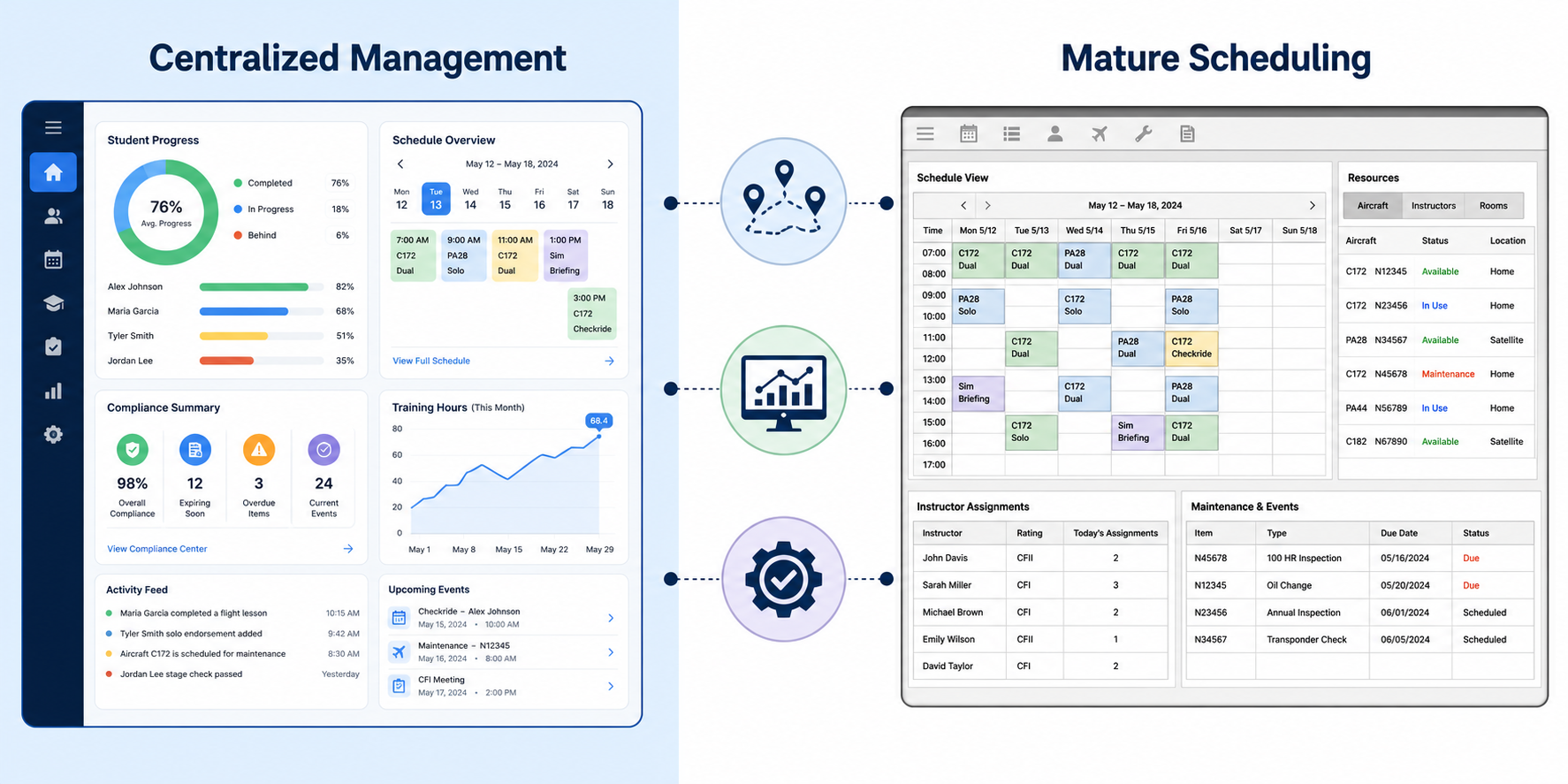
FlightLogger centralizes scheduling, training management, and compliance documentation in one system built specifically for flight training operations. Rather than coordinating separate tools for bookings, student records, and aircraft management, operations teams work from a single source of truth.
The platform connects scheduling decisions directly to training requirements. When dispatchers assign students to aircraft and instructors, they see real-time availability alongside student progression status and training milestones. This integration means scheduling decisions support training outcomes rather than creating administrative bottlenecks.
FlightLogger serves more than 220 organizations across 50+ countries, supporting regulatory requirements for EASA, FAA, CASA, ANAC, and other aviation authorities. The modular architecture lets schools start with core scheduling and expand into maintenance management, compliance tracking, and integrated payments as operations grow.
FlightLogger features
- Unified scheduling workflow: Coordinate students, instructors, and aircraft from one interface without switching between separate systems
- Training progress visibility: See student progression, lesson history, and upcoming requirements alongside scheduling information
- Multi-regulatory compliance: Support for EASA, FAA, CASA, ANAC, and UK CAA documentation requirements
- Real-time resource status: View aircraft availability, maintenance windows, and instructor capacity in one dashboard
- Modular expansion: Add capabilities for maintenance tracking, integrated payments, and advanced reporting as your operation evolves
- Global multi-timezone support: Manage operations across locations with cloud access from anywhere
FlightLogger pros and cons
Pros:
- Scheduling and training management connected in one platform
- Supports compliance across multiple regulatory environments simultaneously
- Dedicated onboarding team with implementation typically completed in 4–6 weeks
Cons:
- Feature depth may exceed needs of very small operations with minimal training programs
- Initial configuration requires defining workflows and operational parameters
- Full platform adoption benefits most when entire team uses the system consistently
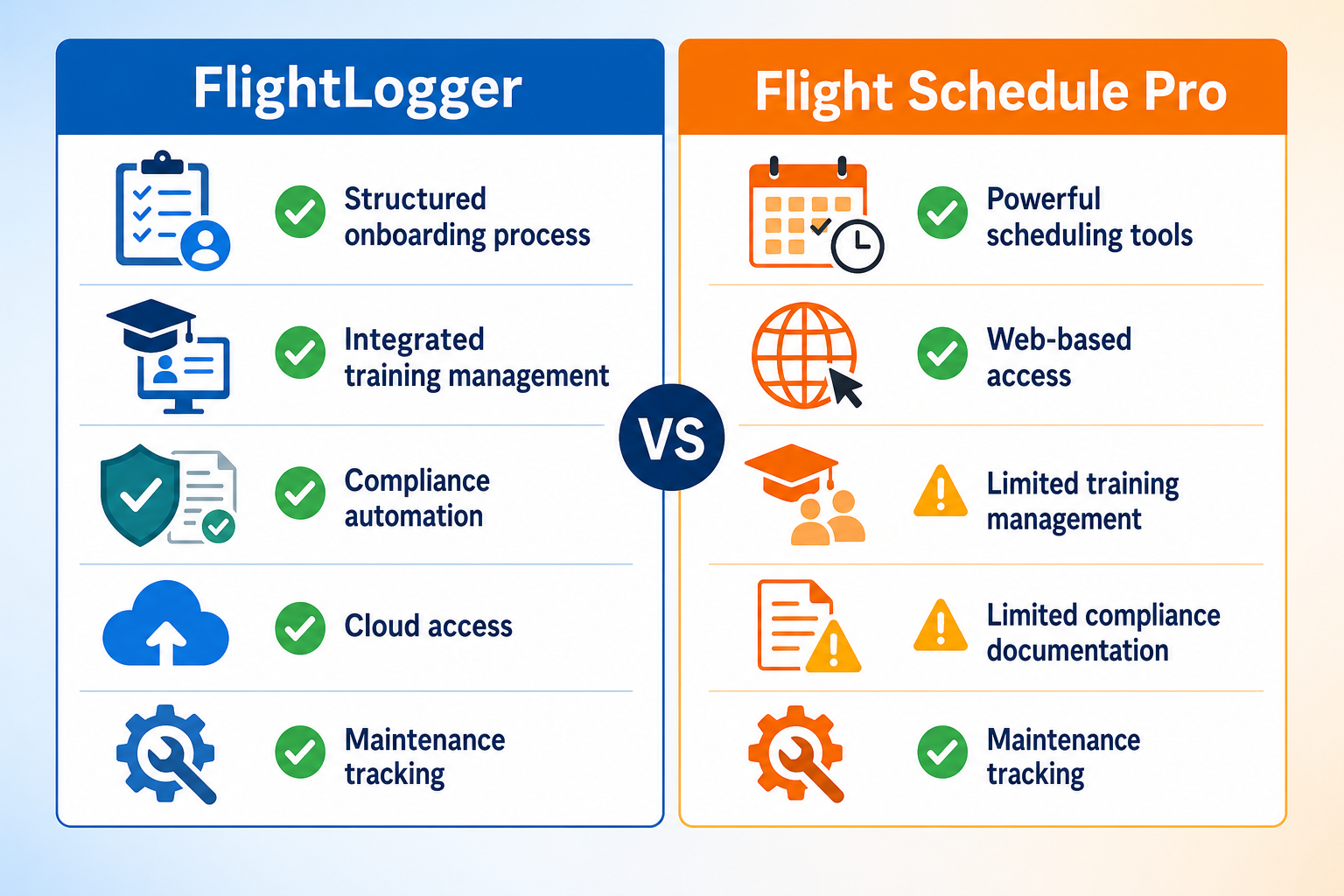
2. Flight Schedule Pro: Scheduling with Part 141 focus
Flight Schedule Pro offers scheduling and training management with an emphasis on FAA Part 61 and Part 141 compliance for U.S.-based flight schools. The platform includes curriculum management with integration for syllabi from Sporty's, King Schools, and Gleim.
The scheduling system uses drag-and-drop functionality for flight bookings and supports recurring reservations. Flight Schedule Pro also includes graduation visibility features that help schools track student progress toward checkride readiness.
Flight Schedule Pro features
- Part 141 compliance support: Built-in workflows designed for FAA regulatory requirements
- Curriculum integration: Pre-built syllabi from industry providers plus custom syllabus options
- Student progress tracking: Tools to identify students who may be falling behind in their training
Flight Schedule Pro pros and cons
Pros:
- Strong focus on FAA Part 141 compliance requirements
- Includes curriculum management with third-party syllabus integration
- iOS mobile app for instructor access
Cons:
- Primary focus on U.S. regulatory environment; limited EASA or international support
- Curriculum features oriented toward structured Part 141 programs
- Some advanced features require higher-tier plans
3. Flight Circle: Scheduling and billing for smaller operations
Flight Circle offers aircraft scheduling and billing tools designed for flight schools and flying clubs. The platform includes point-of-sale functionality, QuickBooks integration, and electronic signature capabilities for rental agreements and checkouts.
The system supports both Part 61 and Part 141 training modules with electronic logbook features. Flight Circle includes maintenance reminders and squawk management for tracking aircraft issues.
Flight Circle features
- Integrated billing: Point-of-sale with credit card processing, ACH payments, and QuickBooks sync
- Training modules: Support for Part 61 and Part 141 training tracking
- Maintenance tracking: Squawk reporting and maintenance reminder system
Flight Circle pros and cons
Pros:
- Combined scheduling and billing in one system
- Supports multiple payment methods including Apple Pay and ACH
- Google Calendar sync for external calendar integration
Cons:
- Training management features less comprehensive than dedicated training platforms
- Primary focus on U.S. operations with FAA compliance
- Some features like automations available only on higher plans
4. Aviatize: Modular platform with dual-regulation support
Aviatize positions itself as an all-in-one flight school management platform with modules covering scheduling, training, billing, maintenance, and compliance. The platform supports both FAA (Part 61 and Part 141) and EASA (Part-DTO and ATO) regulatory frameworks.
The system includes drag-and-drop scheduling with automatic validation checks and predictive planning features. Aviatize offers native iOS and Android apps for students and instructors.
Aviatize features
- Dual-regulation support: Built-in compliance tools for both EASA and FAA requirements
- Modular architecture: Core scheduling with specialized modules for safety management and compliance auditing
- Native mobile apps: iOS and Android applications for booking, check-in, and document management
Aviatize pros and cons
Pros:
- Supports both EASA and FAA compliance in one platform
- Includes safety management and audit modules
- Unlimited users on all plans (no per-user fees)
Cons:
- Newer platform with smaller installed base than established alternatives
- Full module adoption requires operational commitment to the platform
- Some advanced features still in development
5. Talon Systems (TalonETA): University-focused training management
TalonETA from Talon Systems is a web-based training management system with roots in collegiate aviation programs. The platform has served institutions including Embry-Riddle and Western Michigan University since 2001.
The system includes course management with stages, phases, and objectives, plus automated scheduling that suggests each student's next lesson based on curriculum requirements and resource availability.
Talon Systems features
- Curriculum management: Define courses with stages, phases, and prerequisite sequencing
- Automated scheduling suggestions: System recommends next lessons based on student progress and availability
- Reporting library: Access to nearly 300 built-in reports with automated delivery options
Talon Systems pros and cons
Pros:
- Established track record with university aviation programs since 2001
- Deep curriculum and course management capabilities
- Integration with TalonRMS maintenance system
Cons:
- Interface design reflects earlier web development approaches
- Geared toward larger institutional programs with structured curricula
- Implementation complexity may exceed needs of smaller operations
6. Tailplane: Scheduling with student self-service
Tailplane offers flight school scheduling with an emphasis on a clean student booking experience. The platform includes a separate student portal where members can self-manage bookings and view their training progress.
The system covers core scheduling, fleet management, and basic reporting. Tailplane positions itself as simpler alternative for schools that want scheduling without extensive training management features.
Tailplane features
- Student booking portal: Separate interface for student self-service scheduling and account management
- Fleet management: Aircraft tracking with maintenance and inspection visibility
- Customizable views: Multiple scheduling view options with filtering by aircraft, instructor, or student
Tailplane pros and cons
Pros:
- Clean, modern interface design
- Student self-service reduces front desk workload
- No setup or monthly fees for basic tier
Cons:
- Limited training management and compliance features
- Some announced features still listed as "coming soon"
- Smaller user base than established platforms
7. OpenFlights: Basic scheduling for clubs and rentals
OpenFlights offers basic aircraft scheduling functionality oriented toward flying clubs and aircraft rental operations. The platform handles core booking workflows without the training management features found in dedicated flight school systems.
For operations that primarily rent aircraft without structured training programs, OpenFlights can handle basic scheduling needs at lower complexity than full flight school platforms.
OpenFlights features
- Aircraft scheduling: Basic booking calendar for aircraft reservations
- Member management: Track member information and rental history
- Simple interface: Straightforward scheduling without extensive configuration requirements
OpenFlights pros and cons
Pros:
- Simpler setup for basic rental operations
- Lower complexity for clubs without training programs
- Straightforward booking workflow
Cons:
- No training management, compliance, or curriculum features
- Limited for schools with structured training requirements
- Not designed for operations needing regulatory documentation
Comparison table: Flight scheduling tools for flight schools
| Platform | Training Integration | Multi-Regulatory Support | Mobile Apps |
|---|---|---|---|
| FlightLogger | ✓ Full | ✓ EASA, FAA, CASA, ANAC | ✓ Yes |
| Flight Schedule Pro | ✓ Curriculum-focused | FAA only | ✓ iOS |
| Flight Circle | Basic modules | FAA only | Calendar sync |
| Aviatize | ✓ Full | ✓ EASA, FAA | ✓ iOS, Android |
| Talon Systems | ✓ Curriculum-focused | FAA primary | Web-based |
| Tailplane | Progress tracking | Limited | Responsive web |
| OpenFlights | ✗ None | ✗ None | Basic |
What should flight schools look for in scheduling software?
The right scheduling tool depends on your operation's complexity and regulatory environment. Schools managing only aircraft rentals have different requirements than academies running structured training programs across multiple bases.
Start by mapping your daily coordination challenges. If scheduling conflicts, resource visibility, and instructor availability are your primary pain points, focus on platforms with resource validation and conflict detection. If student progression tracking and compliance documentation matter most, prioritize systems that connect scheduling to training management.
Consider your regulatory requirements as well. Operations under multiple aviation authorities need platforms that support concurrent compliance frameworks. A school training under both EASA and FAA requirements needs different capabilities than a single-base Part 61 operation.
How does integrated scheduling reduce operational overhead?
Scheduling that connects to training management, billing, and compliance creates fewer handoffs between systems. Every time data moves from one tool to another—scheduling to billing, billing to training records—there is an opportunity for delays, errors, or missing information.
FlightLogger addresses this by keeping scheduling, training progression, and operational data in one platform. When a flight is completed, the system updates training records, triggers billing, and adjusts aircraft hours without manual data entry between separate systems.
For busy flight schools, this integration means less time reconciling information across tools and more time focused on training delivery. Administrators spend fewer hours on data entry and more hours on activities that directly support student progression.
Why FlightLogger is the leading flight scheduling platform for busy flight schools
FlightLogger connects scheduling, training management, and compliance documentation in one platform built specifically for flight training operations. Unlike generic scheduling tools or platforms focused narrowly on booking calendars, FlightLogger treats scheduling as part of a larger operational workflow.
The platform supports compliance across multiple regulatory environments—EASA, FAA, CASA, ANAC, and UK CAA—allowing schools operating under different authorities to manage everything from one system. This multi-regulatory capability is essential for organizations training students for international careers or operating across multiple jurisdictions.
FlightLogger scales from single-base flight schools to multi-campus university programs. The modular architecture means schools can start with core scheduling and training management, then add maintenance tracking, integrated payments, and advanced analytics as operations grow. Implementation typically completes in 4–6 weeks with dedicated onboarding support.
For flight schools ready to replace fragmented tools with an integrated system, FlightLogger offers the operational visibility and training integration that busy operations need. Book a demo to see how FlightLogger can support your flight training operation.
FAQs about flight scheduling tools for flight schools
What is flight school scheduling software?
Flight school scheduling software coordinates students, instructors, and aircraft for training flights. Unlike generic calendar tools, flight scheduling software validates resource availability, checks aircraft airworthiness, confirms instructor qualifications, and connects bookings to training requirements. FlightLogger centralizes these functions in one platform designed specifically for aviation training operations.
Why do flight schools need specialized scheduling tools?
Flight training scheduling involves interdependent constraints that generic calendars cannot handle. Every lesson requires a student, a qualified instructor, an available aircraft, and alignment with training objectives. Specialized scheduling tools like FlightLogger validate these requirements at booking time, preventing conflicts before they disrupt operations.
How does scheduling software reduce conflicts at busy flight schools?
Scheduling software reduces conflicts by centralizing resource information and validating bookings against real-time availability. FlightLogger checks instructor schedules, aircraft status, and maintenance windows before confirming reservations. This means fewer double-bookings, less time spent on manual coordination, and smoother daily operations.
Can flight scheduling tools handle multiple aircraft and instructors?
Flight scheduling platforms are designed to coordinate multiple resources simultaneously. FlightLogger manages fleet-wide scheduling across aircraft, instructors, and training facilities. The system shows real-time availability for all resources, helping dispatchers make informed assignment decisions without checking separate calendars for each aircraft or instructor.
What compliance features should flight schools look for?
Flight schools should look for scheduling platforms that support their regulatory environment—whether EASA, FAA, CASA, or other authorities. FlightLogger includes compliance documentation for multiple regulatory frameworks, audit-ready record keeping, and training tracking aligned with certification requirements.
How long does it take to implement flight scheduling software?
Implementation timelines vary by platform and operation complexity. FlightLogger typically completes implementation in 4–6 weeks with dedicated onboarding support. The platform includes guided setup, data migration assistance, and training for administrators and instructors to ensure teams can use the system confidently from day one.