.png?width=201&height=201&name=Maintenance%20(Videoannonce%20%E2%80%93%20LinkedIn).png)

How to Automate Flight School Admin in 2026
 Amalie Rasmussen
·
9 minute read
Amalie Rasmussen
·
9 minute read

Your scheduling board updates. An instructor calls in sick. Two aircraft go down for maintenance. And somewhere in the stack of tasks, a student's training record needs updating before tomorrow's stage check. Flight school administration involves dozens of moving parts, and when those parts run on disconnected systems and manual processes, small delays cascade into bigger operational problems. For a step-by-step overview, see our main guide: How to Reduce Flight School Admin Work in 2026.
Administrative automation addresses this reality by connecting scheduling, records, and resource coordination into structured workflows. FlightLogger gives flight schools a centralized platform where these operational elements work together instead of pulling in different directions. This guide walks through the practical steps for automating administrative work at your flight school, from identifying bottlenecks to implementing systems that reduce overhead while improving training continuity.
Key Takeaways: How to Automate Flight School Admin in 2026
- Scheduling automation eliminates double-bookings and resource conflicts by syncing aircraft availability, instructor schedules, and student bookings in real time.
- Digital records management keeps training documentation audit-ready and accessible, reducing compliance preparation time significantly.
- Resource coordination systems connect maintenance schedules to training blocks, preventing unexpected aircraft groundings during peak training periods.
- FlightLogger centralizes scheduling, records, and compliance into one platform, cutting administrative time by up to 75% for operations leaders.
- Successful automation requires mapping current workflows first, then implementing changes in phases to avoid operational disruption.
What Is Flight School Administrative Automation?
Administrative automation means replacing manual, repetitive tasks with structured digital workflows that run without constant human intervention. For flight schools, this covers three primary areas: scheduling automation for aircraft, instructors, and students; records management for training documentation and compliance; and resource coordination for fleet utilization and maintenance alignment.
The goal isn't removing human judgment from operations. You still decide how to allocate resources, when to schedule stage checks, and how to handle weather disruptions. Automation handles the execution of those decisions and ensures nothing falls through the cracks when multiple changes happen simultaneously.
Why Flight Schools Need Automated Systems Now
Flight training demand continues growing while qualified CFI supply remains constrained. This pressure means operations leaders need to maximize training throughput without proportionally increasing administrative overhead. Schools running on calendar apps, messaging groups, and desktop files hit capacity limits not because they lack aircraft or instructors, but because manual coordination becomes unsustainable.
Regulatory requirements add another layer. FAA Part 141 schools must maintain specific training records with documented stage checks, progress reports, and time logs. EASA ATOs face their own documentation standards. Manual record-keeping introduces errors that surface during audits, creating compliance risk that automation largely eliminates.
How Scheduling Automation Works for Flight Schools
Scheduling sits at the center of flight school operations. Every training flight requires an available aircraft, a qualified instructor, and a student ready to fly. Manual scheduling means checking multiple sources before confirming any booking, and any change triggers a cascade of phone calls and message threads.
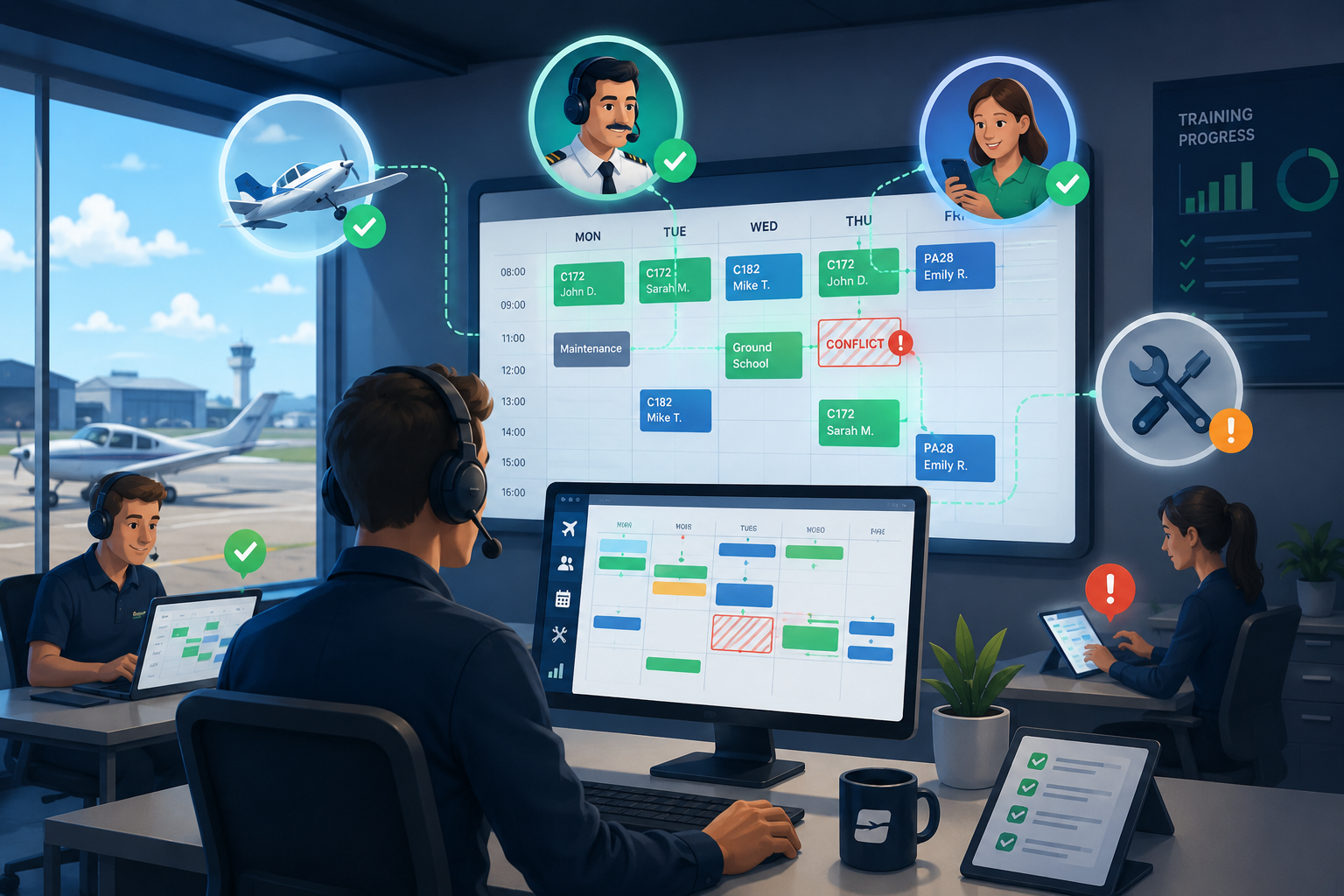
Automated scheduling systems display real-time availability across all resources in a single view. When you book a lesson, the system confirms that the aircraft isn't in maintenance, the instructor is qualified for the training type, and the student has the prerequisites completed. Conflicts trigger alerts instead of creating double-bookings that waste instructor time and damage student confidence.
Core Scheduling Features That Reduce Admin Work
Real-time conflict detection prevents double-bookings automatically. When an aircraft goes into maintenance, it disappears from the bookable pool without manual intervention. Checkout enforcement means students can only book aircraft they're typed in, eliminating the back-and-forth of unauthorized reservation corrections.
Student self-scheduling reduces front-desk workload significantly. Instead of every booking requiring a phone call or email exchange, students view available slots and book directly. Your team reviews and approves rather than manually coordinating every lesson.
Instructor roster management shows each CFI their schedule, student assignments, and upcoming training requirements. When availability changes, the system identifies affected bookings and notifies relevant parties. This replaces the morning scramble of checking who's flying with whom.
Handling Weather Disruptions and Last-Minute Changes
Weather cancellations happen regularly in flight training. The operational question is how quickly you can reschedule affected lessons without creating new conflicts or losing training momentum. Manual systems require calling each student, checking instructor availability, and finding open aircraft slots individually.
Automated systems identify all affected bookings simultaneously and suggest reschedule options based on current availability. Mass notifications reach students and instructors immediately. Some platforms allow one-click rebooking to the next available slot, keeping students on pace instead of waiting days for manual rescheduling.
How Records Automation Supports Compliance and Training Quality
Training records document everything from flight hours to endorsements, stage check results to ground school completion. For Part 61 operations, these records support checkride applications. For Part 141 schools, they're subject to FAA inspection. For international operations under EASA or CASA, specific documentation formats apply.
Manual record-keeping creates two problems. First, errors accumulate. A missed endorsement entry, an incorrect time log, or an unsigned document creates compliance gaps that may not surface until a checkride or audit. Second, retrieval takes time. When an inspector requests documentation, pulling records from filing cabinets or scattered files delays the process and increases anxiety.
Digital Training Records That Stay Audit-Ready
Automated records management captures training data at the source. When a flight ends, the CFI logs time directly in the system. Endorsements link to specific training activities with timestamps. Stage check results connect to student progress records automatically. Nothing requires re-entry or transcription from paper forms.
FlightLogger keeps records in structured formats that align with regulatory requirements for FAA, EASA, CASA, ANAC, and other aviation authorities. When audit time arrives, pulling documentation takes minutes instead of hours. Inspectors see organized, complete records that demonstrate compliance without the scramble.
Tracking Student Progress and Identifying Delays Early
Student progression follows a predictable path: ground school, training flights, stage checks, checkrides. When students fall behind schedule, early intervention prevents small delays from compounding into program extensions. Manual tracking makes this difficult because progress data lives across multiple systems and instructors.
Automated progress tracking shows each student's position against their training plan. Operations leaders can identify students approaching deadlines, see patterns in weather cancellations or scheduling gaps, and intervene before delays stack up. This visibility supports higher completion rates and better student outcomes.
How Resource Coordination Automation Prevents Operational Bottlenecks
Resource coordination connects scheduling with fleet maintenance, instructor qualifications, and training requirements. Without this connection, problems emerge: an aircraft scheduled for training goes into unplanned maintenance, an instructor's medical expires without advance notice, or a student books a stage check without completing prerequisites.
Automated resource coordination surfaces these issues before they become disruptions. Maintenance schedules sync with the booking calendar so aircraft approaching inspections stop accepting new reservations. Instructor credential tracking alerts operations before currency or medical expirations. Student booking rules enforce prerequisite completion automatically.
Connecting Maintenance Schedules to Training Blocks
Aircraft maintenance follows predictable intervals: annual inspections, 100-hour checks, AD compliance. Unplanned maintenance from squawks adds unpredictability. Either way, when aircraft go down, training capacity drops. The question is whether you find out in advance or when a student arrives for a cancelled lesson.
Integrated systems display maintenance status alongside scheduling information. Color-coded dashboards show which aircraft are available, which are approaching maintenance thresholds, and which are currently down. Planning training around maintenance windows becomes proactive instead of reactive.
Squawk tracking adds another layer. Pilots log discrepancies directly in the system after each flight. Mechanics see pending items and can schedule repairs during low-utilization periods. This keeps aircraft available during peak training times while ensuring airworthiness standards remain met.
Managing Instructor Capacity and Qualifications
Instructors have varying qualifications: some hold instrument ratings, others are multi-engine rated, some specialize in specific aircraft types. They also have scheduling constraints, medical certificate expirations, and flight review due dates. Manual tracking of all these factors across a CFI roster creates administrative burden and qualification gaps.
Automated systems maintain instructor profiles with qualifications, certifications, and expiration dates. When scheduling a lesson, the system confirms the instructor holds the required ratings. When credentials approach expiration, alerts notify both the instructor and operations. This prevents scheduling someone for training they're not qualified to give.
Step-by-Step Guide to Implementing Administrative Automation
Implementing automation successfully requires a structured approach. Jumping straight to software selection before understanding your current workflows leads to platforms that don't fit your operation. Taking time upfront to map processes and identify pain points produces better results.
Step 1: Document Your Current Administrative Workflows
Before automating anything, understand how work currently flows through your operation. Walk through a typical booking from initial inquiry to completed flight. Note every touchpoint: phone calls, emails, calendar entries, form completions, record updates. Identify where information transfers between people or systems.
Look for bottlenecks: Where do delays occur? Where do errors happen? Where does the same information get entered multiple times? These friction points indicate where automation will have the most impact. Common problem areas include booking coordination, training record updates, and maintenance-to-scheduling communication.
Step 2: Prioritize Automation Opportunities by Impact
Not every administrative task needs immediate automation. Prioritize based on time consumption, error frequency, and operational impact. Scheduling typically ranks highest because it touches every training flight. Records management follows because compliance depends on accuracy. Resource coordination rounds out the core areas.
Create a prioritized list with estimated time savings for each area. This helps justify the implementation investment and sets expectations for ROI. Most flight schools see the largest gains from scheduling automation first, followed by integrated records management.
Step 3: Select a Platform Built for Flight Training Operations
Generic scheduling or business management software requires extensive customization to handle flight training requirements. Aircraft checkout enforcement, Hobbs-based billing, Part 61 or Part 141 training tracking, and regulatory record formats need purpose-built functionality.
Evaluate platforms against your documented workflows. Does the system handle your specific regulatory environment? Can it manage your fleet size and instructor roster? Does it integrate scheduling with maintenance and records? FlightLogger addresses these requirements with aviation-specific functionality built by professionals who understand flight training operations.
Step 4: Plan Your Implementation in Phases
Attempting to automate everything simultaneously creates operational risk. A phased approach lets your team learn the new system while maintaining training continuity. Start with scheduling—it has the most daily touchpoints and provides immediate visibility into system benefits.
After scheduling stabilizes (typically 4-6 weeks), add records management and compliance tracking. Then integrate maintenance coordination and advanced features. Each phase builds on the previous one, creating a foundation for the next level of automation.
Step 5: Train Your Team and Establish New Procedures
Software only works if people use it consistently. Train CFIs, front-desk staff, and operations personnel on the new workflows. Establish clear procedures for common tasks: how to book a lesson, how to log a flight, how to report a squawk. Document these procedures for onboarding new team members.
Expect a transition period where some processes feel slower than the old way. This is normal. As familiarity increases, efficiency gains emerge. Schedule check-ins to address questions and identify workflow adjustments needed for your specific operation.
What Automation Results Look Like for Flight School Operations
Flight schools implementing structured automation report consistent patterns in their results. Administrative time reductions of 30-50% appear across scheduling, record-keeping, and compliance preparation. Some schools report saving 20+ hours of monthly admin time through automated workflows.
Beyond time savings, operational improvements include fewer scheduling conflicts, faster audit responses, and better student completion rates. When students stay on pace because scheduling works smoothly and progress tracking identifies delays early, program outcomes improve without adding staff.
Reduced Administrative Overhead Without Adding Staff
Growth typically requires adding administrative capacity. Manual systems scale poorly—doubling your student count doesn't just double administrative work, it increases it exponentially as coordination complexity rises. Automation flattens this curve by handling increased volume through structured workflows.
Schools scaling from single-base to multi-campus operations particularly benefit. Consistent workflows across locations mean new facilities adopt established procedures rather than creating their own variations. Data flows between locations automatically, supporting student transfers and resource sharing.
Improved Compliance Confidence
Audit preparation anxiety decreases significantly when records stay current and accessible. Instead of spending weeks organizing documentation before inspections, operations leaders pull reports showing exactly what regulators need. The shift from reactive compliance (scrambling before audits) to ongoing compliance (records always current) reduces stress and risk.
For schools operating under multiple regulatory frameworks—FAA and EASA, for example—automation handles different documentation requirements without duplicating effort. The underlying training data populates required formats for each authority.
Common Mistakes to Avoid When Automating Flight School Administration
Automation implementation can fail when schools make predictable errors. Understanding these pitfalls helps you avoid them in your own implementation.
Starting With Software Before Understanding Workflows
Choosing a platform based on feature lists without mapping your current processes leads to poor fit. The software may do things you don't need while missing functionality you require. Take time to document workflows first, then evaluate platforms against those specific needs.
Trying to Automate Everything at Once
Full-system implementation creates too many changes simultaneously. Staff can't learn new processes when everything changes at once. Training operations can't afford extended disruption. Phased implementation maintains continuity while building toward full automation.
Neglecting Team Training and Change Management
The best software fails if your team doesn't use it correctly. Budget time for training, not just during initial implementation but ongoing as new features release and new staff join. Establish expectations that the new system becomes the single source of truth, not one of several options.
Ignoring Data Migration Requirements
Your existing records don't disappear when you implement new software. Plan for migrating historical training records, student information, aircraft data, and compliance documentation. Some migration happens manually; some platforms support data imports. Either way, allocate time for this transition work.
How FlightLogger Supports Flight School Administrative Automation
FlightLogger centralizes scheduling, records, and resource coordination in one platform designed specifically for flight training operations. The system connects aircraft availability, instructor schedules, student progress, and maintenance status in real time. When any element changes, related components update automatically.
For scheduling, FlightLogger handles conflict detection, checkout enforcement, and student self-booking. For records, the platform maintains training documentation aligned with FAA, EASA, CASA, and other regulatory requirements. For resource coordination, maintenance schedules sync with booking availability and instructor credential tracking prevents qualification gaps.
Implementation typically completes in 4-6 weeks with dedicated onboarding support. The system serves schools ranging from small Part 61 operations to large multi-campus academy programs across 50+ countries. This range reflects a platform built to scale without requiring workarounds or customization.
FAQs About Flight School Administrative Automation
How long does it take to implement administrative automation at a flight school?
Implementation timelines vary based on operation size and complexity. Most flight schools using FlightLogger complete onboarding in 4-6 weeks. This includes system setup, data migration, and staff training. Phased implementation approaches help maintain training continuity during the transition period.
What administrative tasks provide the best return on automation investment?
Scheduling automation typically delivers the highest return because it touches every training flight. Conflict prevention, self-booking, and automated notifications reduce daily administrative burden immediately. Records management ranks second for compliance-focused operations where audit preparation consumes significant time.
Can automation work for small flight schools with limited staff?
Small operations often benefit most from automation because they lack dedicated administrative staff. FlightLogger helps single-location schools manage scheduling and records without hiring additional personnel. The platform scales from small Part 61 schools to large academy programs, adjusting to your operation size.
How does automated record-keeping support regulatory compliance?
Automated systems capture training data at the source with timestamps and signatures, eliminating transcription errors. FlightLogger maintains records in formats aligned with FAA, EASA, CASA, and other regulatory requirements. When audits occur, pulling documentation takes minutes instead of days.
What happens to historical training records when implementing new software?
Data migration transfers existing records into the new system. Some migration requires manual entry; some platforms support bulk imports. Plan migration time into your implementation timeline. FlightLogger's onboarding team supports data transfer to ensure training continuity and complete student records.
Does scheduling automation handle weather cancellations and last-minute changes?
Automated scheduling systems identify affected bookings when disruptions occur and suggest reschedule options based on current availability. Mass notifications reach students and instructors immediately. This replaces individual phone calls and manual rebooking for each cancelled lesson.