.png?width=201&height=201&name=Maintenance%20(Videoannonce%20%E2%80%93%20LinkedIn).png)

Top 7 Flight School Workflow Fixes for 2026
 Amalie Rasmussen
·
8 minute read
Amalie Rasmussen
·
8 minute read
Quick guide: 7 flight school workflow fixes that reduce admin and keep training on track
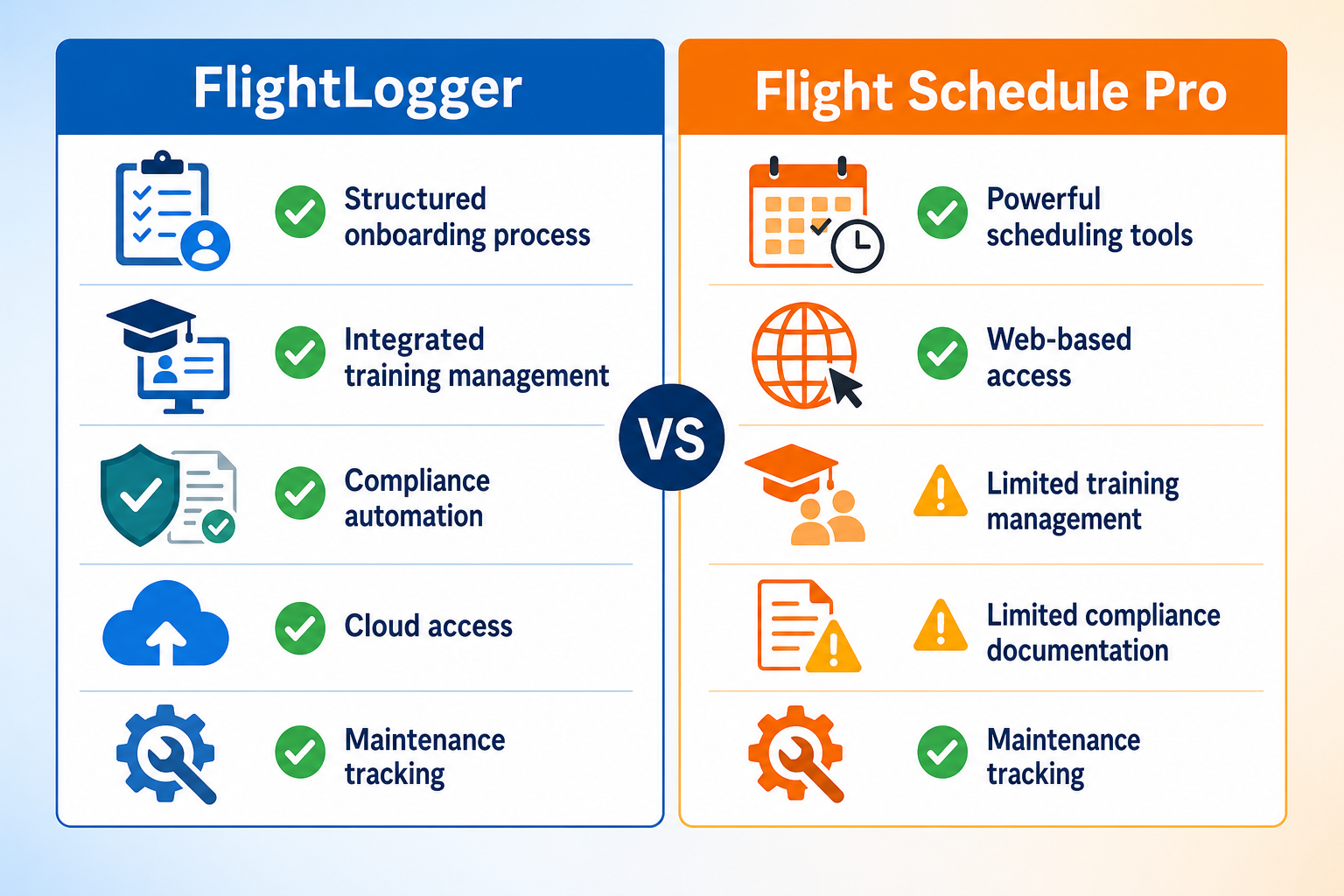
- FlightLogger: The leading integrated platform for centralized scheduling, training management, and compliance
- Flight Schedule Pro: Modular hubs for US Part 61/141 scheduling and dispatch
- Aviatize: Configurable workflows for schools needing deep customization
- Flight Circle: Clean interface for smaller operations and flying clubs
- Talon Systems: Curriculum-focused tools for university flight programs
- Private Radar: Real-time aircraft tracking with scheduling integration
- Flylogs: Entry-level option for smaller European flight schools
How we chose the workflow fixes for flight schools
Running a flight school means coordinating aircraft, instructors, students, maintenance schedules, and regulatory documentation—often across multiple locations. When these elements run through different tools or manual processes, the result is wasted admin hours, scheduling conflicts, and training delays that stack up fast.
We evaluated workflow solutions based on criteria that matter most to growing training organizations:
- Unified scheduling: Can aircraft, instructors, and students be managed in one system to eliminate double-booking and reduce coordination time?
- Training progress visibility: Does the platform track student progression, grading, and competency milestones in real time?
- Maintenance integration: Are maintenance schedules connected to the booking system to prevent aircraft being assigned when grounded?
- Compliance documentation: Does the system generate audit-ready records for FAA, EASA, CASA, or other regulatory frameworks?
- Admin time reduction: Does the platform automate repetitive tasks like billing, notifications, and record updates?
- Multi-location support: Can operations scale across multiple bases with consistent workflows and centralized data?
- Mobile accessibility: Can instructors and students book, log, and review training from any device?
The 7 flight school workflow fixes for 2026
1. FlightLogger: The leading integrated platform for flight school operations
Behind every successful flight school is an operation that connects scheduling, training, maintenance, and compliance in one place. FlightLogger delivers exactly that—a centralized digital backbone built specifically for flight training organizations.
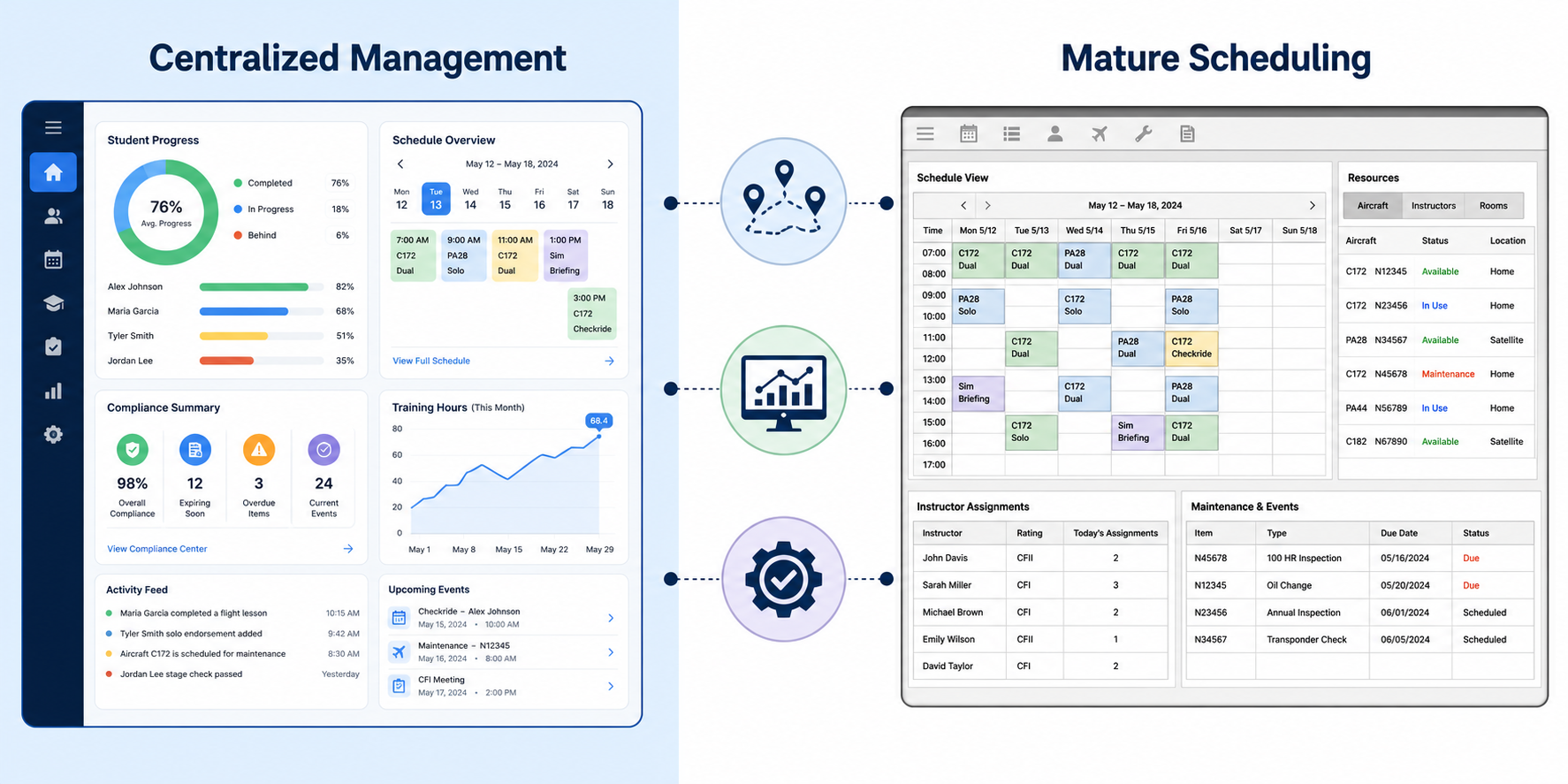
FlightLogger gives you real-time visibility across your entire operation. Instructors see their schedules, students track their progress, and administrators manage resources from a single dashboard. When weather forces cancellations or instructor availability changes, the system updates everyone instantly.
Training organizations using FlightLogger report documented efficiency gains: Sevenair Academy reduced administrative workload by 30% after implementation. The platform handles EASA, FAA, CASA, and ANAC compliance requirements, making it suitable for schools operating under multiple regulatory frameworks.
FlightLogger connects flight and ground training as a unified learning journey rather than separate tracks. This approach helps students progress more smoothly and helps instructors maintain consistent grading standards across all training elements.
FlightLogger features
- Centralized scheduling: Aircraft, instructors, and students coordinated in one system with real-time conflict detection
- Student progress tracking: Digital grading, competency-based assessment, and lesson-level progress monitoring
- Maintenance coordination: Scheduling integrated with maintenance windows to prevent booking conflicts
- Compliance documentation: Audit-ready records with automatic expiry tracking for certificates and medical documentation
- Cloud-based access: Instructors and students can book, log, and review training from any device, anywhere
- Multi-location support: Standardized workflows and data structures across multiple training bases
FlightLogger pros and cons
Pros:
- Unifies scheduling, training, maintenance, and compliance in a single platform serving 200+ schools across 47+ countries
- Reduces administrative workload by up to 75% through automated workflows and digital record-keeping
- Supports multiple regulatory frameworks (EASA, FAA, CASA, ANAC) for international operations
Cons:
- Full platform adoption requires commitment from all staff members during onboarding
- Some advanced features like Safety Management System (SMS) require add-on modules
- Schools with very basic needs may not require the full depth of functionality
2. Flight Schedule Pro: Modular hubs for US-focused operations
Flight Schedule Pro has built a presence in the US market over two decades, serving more than 1,300 flight schools and university programs. The platform uses a hub-based architecture with separate modules for scheduling, billing, training, maintenance, and reporting.
The scheduling hub handles aircraft booking and instructor assignment with drag-and-drop functionality. Students can log in and schedule their own flights, which reduces coordination time for staff. Changes to the schedule trigger automatic notifications to all affected parties.
Flight Schedule Pro features
- Drag-and-drop scheduling: Visual interface for managing aircraft and instructor assignments
- Part 141/61 compliance: Training records aligned with FAA requirements
- Modular architecture: Purchase only the hubs your operation needs
Flight Schedule Pro pros and cons
Pros:
- Large installed base in the US with established support community
- Scheduling engine proven across thousands of flight school implementations
- Integration partnerships with ground school content providers
Cons:
- Mobile app available only for iOS devices—Android users access through web interface
- Regulatory support limited to US FAA frameworks
- Individual hubs purchased separately can add up compared to all-in-one pricing
3. Aviatize: Configurable workflows for custom requirements
Aviatize positions itself as an operating system for flight schools, offering deep customization of booking types, validation rules, and rate structures. The platform includes scheduling, billing, training management, and maintenance tracking in an integrated system.
The validation engine checks documents, account balances, maintenance status, and training requirements at multiple levels before confirming a flight. Administrators control which conditions trigger warnings versus which block bookings entirely.
Aviatize features
- Validation engine: Configurable rules for document, balance, and maintenance checks
- Itemized billing: Separate line items for aircraft, instructor, landing fees, and extras
- Data portability: CSV export/import and REST API for system flexibility
Aviatize pros and cons
Pros:
- Supports 110+ aviation authorities for multi-framework compliance
- Per-aircraft pricing includes unlimited users
- Full maintenance workflow with work orders and parts tracking
Cons:
- Newer to the market with a smaller installed base than established players
- Real-time aircraft tracking available only through integrations
- Configuration depth may exceed requirements for schools with simpler operations
4. Flight Circle: Clean interface for smaller operations
Flight Circle has gained popularity among smaller flight schools and flying clubs for its straightforward interface and entry-level pricing. The platform covers aircraft scheduling, billing with Hobbs/tach time tracking, and basic maintenance logging.
The Part 61/141 training module includes a syllabus builder and lesson grading. Students can view their availability and manage their own schedules, which reduces back-and-forth communication with staff.
Flight Circle features
- Hobbs-driven billing: Automatic invoicing based on logged flight time
- Syllabus builder: Create and track training programs with lesson progress
- Squawk management: Report and track aircraft issues with maintenance reminders
Flight Circle pros and cons
Pros:
- Intuitive interface that staff and students can learn quickly
- Entry-level per-aircraft pricing accessible to smaller operations
- QuickBooks integration available for accounting sync
Cons:
- Training module may not match depth required for complex Part 141 programs
- No native mobile app—uses mobile-friendly web interface
- Maintenance tracking does not include work orders or parts inventory
5. Talon Systems: Curriculum management for university programs
Talon Systems' ETA platform has served the flight training industry since 2001. Major university programs including Embry-Riddle Aeronautical University use the system for structured course tracking, stage check management, and detailed student records.
The platform includes a Flight Risk Assessment Tool and flight following capabilities. ETA's strengths lie in curriculum management for Part 141 collegiate programs that require structured documentation.
Talon Systems features
- Curriculum tracking: Stage checks and course progression for Part 141 programs
- Flight risk assessment: Built-in tool for pre-flight safety evaluation
- Student records: Detailed documentation for regulatory compliance
Talon Systems pros and cons
Pros:
- Two decades of experience serving major university flight programs
- Part 141 curriculum management with stage check workflows
- Flight dispatch and following capabilities included
Cons:
- User interface has not been updated to match modern design standards
- Mobile app reported as limited compared to web functionality
- Separate products for training, maintenance, and safety rather than a unified system
6. Private Radar: Real-time tracking with management tools
Private Radar differentiates itself with real-time aircraft tracking integrated directly into the scheduling platform. With hardware installed in each aircraft, the system provides live position tracking, automated flight log generation, and safety alerts.
Beyond tracking, the platform offers scheduling, training management with evaluations, a CAMO module for airworthiness management, and billing. The modular approach lets schools pay only for the features they need.
Private Radar features
- Live position tracking: Real-time visibility into aircraft location and flight status
- Automated flight logs: Route recording and log generation from actual flights
- CAMO module: Airworthiness management for European regulatory requirements
Private Radar pros and cons
Pros:
- Real-time tracking capability that no other platform replicates natively
- Modular pricing lets schools select only needed features
- CBTA support for EASA compliance requirements
Cons:
- Tracking hardware adds upfront cost and ongoing maintenance per aircraft
- No published pricing—requires custom quote
- Billing flexibility more limited than platforms with itemized rate engines
7. Flylogs: Entry-level option for European schools
Flylogs targets smaller European flight schools and aero clubs with a platform covering scheduling, training, billing, and maintenance tracking. A free tier is available for basic logbook and document storage, with paid plans priced per active aircraft.
The platform includes a built-in theory/e-learning system with multimedia and exam tracking. Safety Management System (SMS) functionality comes included by default rather than as an add-on module.
Flylogs features
- Built-in e-learning: Theory courses and exam tracking included in the platform
- SMS included: Safety management functionality available in all plans
- EASA logbook format: Compliant documentation for European regulatory requirements
Flylogs pros and cons
Pros:
- Free tier available for schools with basic requirements
- Safety Management System included by default
- Maintenance work orders with scheduling integration
Cons:
- Smaller support team compared to larger platform providers
- No confirmed accounting software integrations
- May not scale for operations with complex multi-location requirements
Comparison table: Flight school workflow platforms for 2026
| Platform | Multi-Regulatory Support | Unified Training + Scheduling | Mobile App |
|---|---|---|---|
| FlightLogger | EASA, FAA, CASA, ANAC | ✓ | iOS + Android |
| Flight Schedule Pro | FAA only | ✓ | iOS only |
| Aviatize | 110+ authorities | ✓ | iOS + Android |
| Flight Circle | FAA only | ✓ | Web only |
| Talon Systems | FAA only | Separate products | Limited |
| Private Radar | EASA focus | ✓ | Available |
| Flylogs | EASA focus | ✓ | Available |
What causes flight school workflow bottlenecks?
Most workflow problems in flight training stem from disconnected information. When scheduling lives in one system, training records in another, and maintenance tracking in spreadsheets, staff spend hours each week reconciling data and chasing down updates.
The symptoms show up as scheduling conflicts, last-minute cancellations when aircraft maintenance was overlooked, and training delays because progress records weren't updated. Instructors end up doing administrative work instead of teaching. Students wait for paperwork instead of flying.
Industry estimates suggest a 10-aircraft operation can lose significant revenue annually in unbilled flight time alone when billing isn't integrated with scheduling. Beyond the financial impact, fragmented systems create compliance risks—auditors expect consistent, retrievable documentation, not scattered records across multiple tools.
How do centralized workflows improve flight training outcomes?
When operations run through a single platform, information flows where it needs to go without manual intervention. A maintenance event automatically blocks the affected aircraft from scheduling. A completed lesson updates the student's progress record. A booking triggers the correct billing line items.
This visibility changes how decisions get made. Instead of reacting to problems after they occur, operational leaders can identify bottlenecks before they affect training. If a cohort is falling behind schedule, the data shows it early enough to intervene.
FlightLogger gives you this operational clarity by connecting every department—training, scheduling, maintenance, and compliance—in one system. The result is fewer scheduling conflicts, faster course completion times, and stronger audit readiness. As Sevenair Academy's operations manager noted, the platform became "the glue" connecting their departments and enabling growth without losing control.
Why FlightLogger is the leading flight school workflow fix for 2026
Flight schools face a common challenge: as operations grow, fragmented systems begin to limit performance. The admin overhead increases. Training delays stack up. Compliance becomes harder to maintain. FlightLogger solves this by unifying operations in a platform built specifically for flight training.
FlightLogger reduces administrative workload by up to 75% through automated workflows and digital record-keeping. Instructors log training events in minutes. Admin teams stop chasing paper trails. Students progress more smoothly because they aren't waiting for records or scheduling updates.
The platform supports training organizations across 47+ countries under EASA, FAA, CASA, and ANAC frameworks. This multi-regulatory support matters for schools operating internationally or training students from different jurisdictions. FlightLogger handles the compliance documentation for each framework automatically.
For growing operations that need scalability without losing control, FlightLogger delivers the centralized digital backbone that modern flight training requires. Operations don't pause while you figure out how to coordinate them—with FlightLogger, everything connects in one place.
Book a walkthrough to see how FlightLogger can fix your flight school workflows.
FAQs about flight school workflow fixes
What is the biggest workflow problem flight schools face?
Disconnected tools create the biggest workflow challenges. When scheduling, training records, billing, and maintenance run through separate systems, staff waste hours on coordination and data reconciliation. FlightLogger solves this by centralizing all operations in one platform, giving you real-time visibility across your entire training organization.
How much admin time can flight schools save with better workflows?
Flight schools using centralized platforms report significant time savings. FlightLogger customers document reductions in administrative workload of 30-75%, depending on how fragmented their previous operations were. Sevenair Academy reduced admin by 30% after implementing FlightLogger across all departments.
Do workflow platforms support multiple regulatory frameworks?
Yes, though support varies by platform. FlightLogger supports EASA, FAA, CASA, and ANAC frameworks, making it suitable for schools training under multiple regulatory authorities. Other platforms may focus on a single market—Flight Schedule Pro and Talon Systems support FAA requirements specifically.
How do workflow fixes help with compliance audits?
Centralized platforms generate audit-ready documentation automatically. FlightLogger tracks certificate expiries, maintains digital training records, and organizes compliance documentation for instant retrieval. Sevenair Academy passed an authority audit with zero findings after implementing the platform.
Can smaller flight schools benefit from workflow platforms?
Yes. While larger operations see the most dramatic improvements, smaller schools benefit from reduced administrative burden and improved scheduling accuracy. FlightLogger scales from single-base schools to multi-campus university programs, with functionality that grows alongside your operation.
What should flight schools look for when choosing a workflow platform?
Prioritize unified scheduling with training management, maintenance integration, compliance documentation, and mobile accessibility. FlightLogger delivers all of these in a single platform, with dedicated onboarding support to help your team transition smoothly. The platform connects instructors, students, and administrators through workflows designed specifically for flight training.