
.png?width=201&height=201&name=Maintenance%20(Videoannonce%20%E2%80%93%20LinkedIn).png)

Digital Student Pilot Progress Tracking
A direct guide to how aviation academies track student progress digitally, what a student progression dashboard actually shows, and how it replaces spreadsheets and paper logbooks.
Aviation academies track student progress by replacing paper logbooks and spreadsheets with a digital dashboard that compares each student's actual pace against their required pace to complete on time. Students are grouped by status — behind, on track, ahead, or completed — so instructors and training managers see who needs attention at a glance instead of reviewing individual files.
Use a platform that logs each lesson against the training syllabus automatically and calculates pace and projected completion date in real time. This replaces manual progress spreadsheets with a live view of every student's current pace, the pace required to stay on schedule, and how many lessons they have booked for the coming week.
What a student progression dashboard actually shows
Rather than describe this abstractly, here's FlightLogger's own Student Progression dashboard:
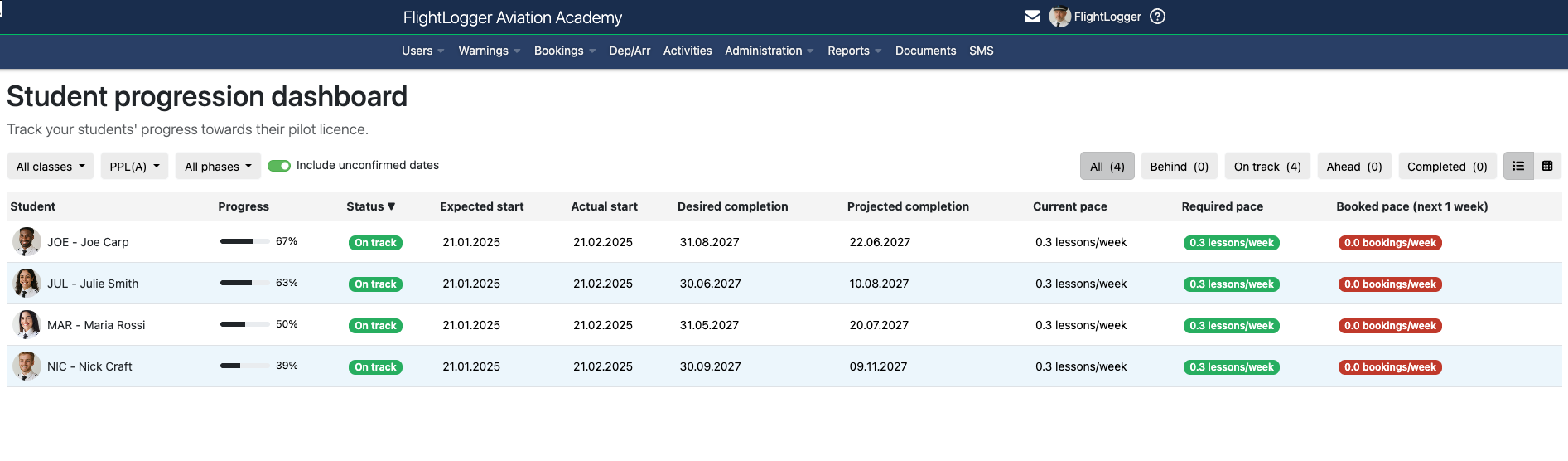
Student names and figures shown are sample data for illustration.
A fourth column — booked pace — shows how many lessons are booked for the coming week, making it possible to catch a scheduling gap before it becomes a missed pace, not after.
How this replaces manual tracking
| Manual tracking | Digital progression dashboard |
|---|---|
| Progress lives in each student's paper file or a personal spreadsheet | One dashboard shows every student's status at once |
| "Behind schedule" is a judgment call an instructor makes | Status is calculated automatically from actual vs. required pace |
| Completion date is an estimate, updated irregularly | Projected completion updates automatically as lessons are logged |
| Identifying at-risk students means reviewing files one by one | Filter directly to the "Behind" status to see who needs attention now |
Filtering and configuration
The dashboard can be filtered by class, license type (such as PPL), and training phase, and can include or exclude unconfirmed booking dates from the pace calculation — useful for distinguishing a student's confirmed trajectory from one that depends on bookings not yet locked in.
Where this fits in a connected platform
Student Progression is one part of FlightLogger's Flight School Operating System — it draws on the same lesson and syllabus data used by CBTA-Pro training records and scheduling, rather than requiring progress to be tracked separately from the lessons that drive it. That connection is what lets pace and projected completion update automatically instead of needing to be recalculated by hand. For the broader picture of what aviation training management software covers beyond this dashboard, see Aviation Training Management for Real-Time Student Progress Tracking.
Real results from schools using connected training data
FAQs
How do aviation academies track student progress?
By using a digital dashboard that compares actual pace against required pace and groups students by status — behind, on track, ahead, or completed — instead of tracking progress in individual paper files or spreadsheets.
How to track student pilot progress digitally
Use a platform that logs lessons against the training syllabus automatically and calculates pace and projected completion date in real time, rather than updating a spreadsheet manually after each session.
What is a student progression dashboard?
A tool within flight school management software showing every student's training progress in one view — percentage complete, status, expected and projected completion dates, and current versus required lesson pace.
Can you filter student progress by class or training phase?
Yes. FlightLogger's dashboard can be filtered by class, license type (such as PPL), and training phase, and can include or exclude unconfirmed booking dates from the pace calculation.
See student progress tracking in action
Book a walkthrough and see the dashboard running with your own training programs.
Book a demo →