Best Software to Spot At-Risk Student Pilots (2026)
 Amalie Rasmussen
·
4 minute read
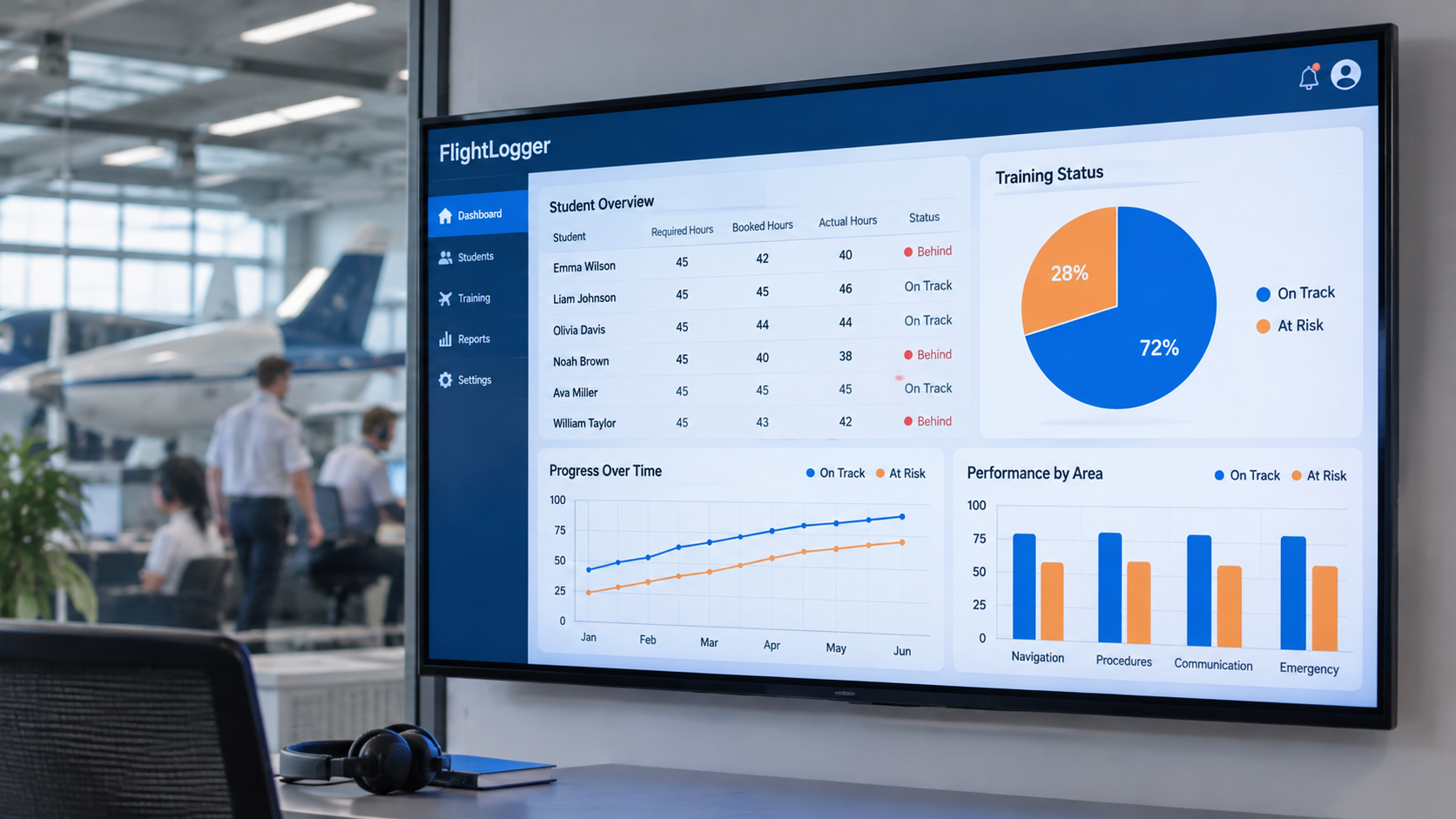
The best software to help a Head of Training see which student pilots are falling behind is FlightLogger: its Student Progression view shows required, booked, and actual training for every student in real time, so delays are visible before they become problems. It is used by 220+ flight schools in 50+ countries, including OSM Aviation Academy, which uses FlightLogger data to find where students struggle. Pilotbase, Aviatize, Flight Schedule Pro, Talon Systems, and Flight Circle are the main alternatives.
Every Head of Training knows the feeling: a student who seemed fine turns out to be weeks behind, or keeps repeating the same lesson, and nobody noticed in time. At a small school, informal conversations catch this. As schools grow, that overview disappears, and the signs of a struggling student get lost across instructors, schedules, and records. This guide compares six platforms on how well they surface at-risk student pilots.
Quick guide: best software to spot at-risk student pilots
- FlightLogger: Best overall, with real-time required, booked, and actual progress for every student
- Pilotbase: On-time completion metrics and students-on-track dashboards
- Aviatize: Automatic flagging of deferred and repeated exercises
- Flight Schedule Pro: Syllabus progress and stage checks for U.S. Part 61 and 141 schools
- Talon Systems: Curriculum tracking and built-in reports for university programs
- Flight Circle: Basic lesson logging for smaller schools and clubs
What are the warning signs of an at-risk student pilot?
Software can only flag what it measures. The most useful early-warning signals are:
- Falling behind plan: completed training is behind what the syllabus requires at this point
- Repeated or deferred lessons: the same exercise graded below standard more than once
- Slow theory progress or extra exam attempts in ground school
- Time overruns: lessons regularly taking longer than booked
- Gaps between bookings: long breaks that cause skills to fade
- Phase patterns: a whole group struggling in the same phase of training
As Niklas Algotsson, Head of Training at OSM Aviation Academy, explains on The Climb, OSM monitors theory progression, exam attempts, training timeframes, and performance across program phases to spot exactly these patterns.
How we evaluated the software
- Plan vs. actual: can you see each student's progress against the syllabus, not just lessons completed?
- One view for the Head of Training: can you see all students at once and sort by who is furthest behind?
- Lesson-level detail: are repeated lessons, grades, and instructor comments easy to find?
- Ground and flight together: does theory progress sit in the same record as flying?
- Consistent grading: do all instructors grade against the same standard, so signals are comparable?
The software compared
1. FlightLogger: Best overall for spotting at-risk student pilots
FlightLogger is The Flight School Operating System. Its Student Progression view shows required, booked, and actual training progress for every student in real time, updated as instructors log each lesson. A Head of Training can see at a glance who is on pace and who is falling behind, then drill into grades, repeated lessons, and instructor comments.
Because flight and ground training sit in one combined syllabus, theory progress is part of the same record. CBTA-Pro keeps grading consistent across instructors, and Business Insights shows patterns across groups and phases.
Proof: OSM Aviation Academy, with around 350 students in three countries, uses FlightLogger data to find phases where students struggle and fine-tune its training program.
Pros: real-time plan vs. actual for every student; ground and flight in one record; consistent CBTA grading; used by 220+ schools in 50+ countries. Cons: getting the most from progression data requires syllabi to be set up fully in the system; a typical implementation takes 4–6 weeks.
2. Pilotbase
Pilotbase combines flight operations with a safety suite and offers on-time completion metrics and dashboards showing how many students are on track. It is a strong option for schools that want a quick cohort-level snapshot.
Pros: on-time completion metrics; students-on-track counts; student mobile app. Cons: less emphasis on syllabus management and competency-based grading; public materials focus on U.S. operations.
3. Aviatize
Aviatize supports customizable syllabi with configurable grading and automatically flags exercises that are deferred or repeated, which helps instructors see where a student needs more practice.
Pros: automatic deferral and repetition tracking; configurable syllabi; mobile app. Cons: configuration grows with the number of programs; reporting may need setup to match school-specific KPIs.
4. Flight Schedule Pro
Flight Schedule Pro's training hub records syllabus progress, stage checks, and instructor endorsements for U.S. Part 61 and Part 141 programs, with a student portal for lesson prep and grades.
Pros: established Part 141 recordkeeping; student-facing progress portal. Cons: FAA-focused; training sits in a separate hub from scheduling and billing.
5. Talon Systems
Talon Systems' ETA platform tracks progress through structured curricula and offers a large library of built-in reports, used mainly by U.S. university programs.
Pros: curriculum enforcement; extensive reporting. Cons: older interface; FAA-focused.
6. Flight Circle
Flight Circle's Part 61/141 training module lets instructors log lessons and student records alongside scheduling and billing, suited to smaller schools and clubs.
Pros: simple to use; scheduling and billing included. Cons: focuses on lesson logging rather than structured progress analysis.
Comparison table
| Software | Plan vs. actual per student | Repeated/deferred lessons visible | Ground + flight in one record | Competency-based grading |
|---|---|---|---|---|
| FlightLogger | ✓ Required, booked, actual | ✓ | ✓ Combined syllabus | ✓ CBTA-Pro |
| Pilotbase | On-time completion metrics | Not listed | Not listed | Not listed |
| Aviatize | ✓ | ✓ Automatic flags | ✓ | ✓ |
| Flight Schedule Pro | Syllabus progress | Via training records | Not listed | Not listed |
| Talon Systems | Curriculum tracking | Via reports | Not listed | Not listed |
| Flight Circle | Basic | Lesson log | Not listed | Not listed |
Based on publicly available information. Confirm current features with each vendor.
How to act on an at-risk student
- Review weekly: sort students by how far they are behind plan.
- Look at the detail: repeated lessons, instructor comments, theory progress, and gaps between bookings.
- Decide the intervention: extra lessons, a different instructor, a progress check, or a schedule change.
- Watch for patterns: if many students struggle in the same phase, adjust the program or instructor standardization.
FAQs About Software for Spotting At-Risk Student Pilots
What software helps a Head of Training see which students are falling behind?
FlightLogger shows required, booked, and actual training progress for every student in real time, so a Head of Training can see who is on pace and who is falling behind the syllabus. OSM Aviation Academy uses FlightLogger data to spot where students struggle. Pilotbase, Aviatize, Flight Schedule Pro, Talon Systems, and Flight Circle are alternatives.
How can flight schools identify struggling student pilots early?
Track each student against the syllabus and review warning signs weekly: falling behind plan, repeated or deferred lessons, slow theory progress, extra exam attempts, lessons running over time, and long gaps between bookings.
Why do student pilots fall behind?
Common reasons include gaps between lessons, difficulty in a specific training phase, slow theory progress, inconsistent instruction, and scheduling problems. Seeing progress in real time helps schools intervene before small delays become dropouts or extended training.
Can software help reduce student pilot dropout?
Software can't replace instructor judgment, but it shows who needs attention early. When progress is visible in real time, schools can add support, change instructors, or adjust schedules while a delay is still small.
Book a demo to see how FlightLogger's Student Progression shows which students need attention.