.png?width=201&height=201&name=Maintenance%20(Videoannonce%20%E2%80%93%20LinkedIn).png)

How to Choose Flight School Scheduling Software in 2026
 Amalie Rasmussen
·
4 minute read
Amalie Rasmussen
·
4 minute read

Flight scheduling is the operational backbone of every flight school. Every lesson depends on the right aircraft, instructor, student, and training objective coming together at the right time. When scheduling breaks down, the effects ripple across the entire organization—creating delays, underutilized aircraft, frustrated instructors, and slower student progression.
That's why choosing the right flight school scheduling software is about much more than finding a digital calendar. The best solutions connect scheduling with training management, aircraft operations, maintenance, compliance, and reporting to help schools operate as one coordinated system.
This guide explains what to look for in flight school scheduling software in 2026, the mistakes to avoid, and how to choose a platform that supports both your current needs and future growth.
Quick Answer
The best flight school scheduling software connects aircraft scheduling, instructor scheduling, student progression, maintenance, and operational planning in one platform. Rather than simply booking lessons, it helps flight schools reduce scheduling conflicts, improve aircraft utilization, streamline administration, and provide complete visibility across daily operations.
Why Generic Scheduling Software Isn't Enough
Many scheduling platforms are designed for appointment-based businesses.
Flight schools are different.
Every booking depends on multiple operational factors:
- Student progression
- Instructor qualifications
- Aircraft availability
- Maintenance status
- Training requirements
- Weather considerations
- Regulatory compliance
Generic scheduling tools can't manage these dependencies effectively.
Purpose-built aviation scheduling software is designed specifically for the operational complexity of flight training.
What Should Flight School Scheduling Software Do?
The best scheduling platforms don't simply organize calendars—they coordinate your entire operation.
A modern scheduling system should connect:
- Students
- Instructors
- Aircraft
- Training records
- Maintenance
- Compliance
- Reporting
Scheduling becomes the operational hub that keeps every department aligned.
1. Evaluate Aircraft Scheduling Capabilities
Aircraft are among your most valuable resources.
Your scheduling software should provide visibility into:
- Aircraft availability
- Fleet utilization
- Aircraft type
- Reservations
- Maintenance status
- Inspection windows
Effective aircraft scheduling ensures resources are allocated efficiently while reducing operational conflicts.
2. Look Beyond Instructor Availability
Managing instructor calendars isn't enough.
Your software should also consider:
- Instructor qualifications
- Training authorizations
- Assigned students
- Workload balancing
- Availability across multiple locations
Strong instructor scheduling improves both operational efficiency and the student experience.
3. Connect Scheduling With Student Progression
Scheduling shouldn't happen independently of training.
Students should be booked according to:
- Completed lessons
- Training syllabus
- Competencies
- Learning objectives
- Certification requirements
Integrated flight training management ensures students receive the right lesson at the right time.
4. Include Maintenance in the Scheduling Process
Aircraft maintenance should never come as a surprise to the scheduling team.
Modern scheduling software connects maintenance planning with operational scheduling by automatically reflecting:
- Aircraft downtime
- Scheduled inspections
- Service intervals
- Fleet availability
This reduces last-minute cancellations and improves resource planning.
5. Prioritize Conflict Prevention
The best scheduling software prevents problems before they occur.
Look for tools that automatically identify:
- Double-booked aircraft
- Instructor conflicts
- Student booking conflicts
- Maintenance overlaps
- Resource shortages
Effective scheduling conflict resolution begins before schedules are published.
6. Support Multi-Base Operations
If your organization operates multiple training locations—or plans to—you'll need software that scales.
Look for:
- Shared scheduling
- Base-specific resources
- Centralized reporting
- Standardized workflows
- Organization-wide visibility
This helps maintain consistent operations while allowing local teams to manage day-to-day activities.
7. Measure Utilization, Not Just Availability
Availability tells you whether a resource can be booked.
Utilization tells you whether it's being used effectively.
The best platforms provide reporting on:
- Aircraft utilization
- Instructor utilization
- Student progression
- Lesson completion
- Cancellation rates
- Scheduling efficiency
These insights help leaders continuously improve operations.
8. Choose Software That Connects the Entire Operation
Scheduling shouldn't exist in isolation.
Instead, it should connect with:
- Student records
- Training progression
- Maintenance planning
- Compliance documentation
- Billing
- Reporting
When every workflow shares the same information, administration becomes significantly simpler.
Questions to Ask Before Choosing Scheduling Software
When evaluating vendors, ask questions such as:
- Can the platform schedule aircraft and instructors together?
- Does maintenance automatically affect aircraft availability?
- Can scheduling follow student progression?
- How are scheduling conflicts identified?
- Can multiple training locations operate in one system?
- What reporting is available for utilization and operational performance?
- Does the platform integrate with training records and compliance?
The answers reveal whether you're buying a scheduling calendar or a complete operational platform.
Common Mistakes When Choosing Scheduling Software
Many flight schools focus on individual features instead of operational workflows.
Avoid these common mistakes:
Choosing Generic Calendar Software
General scheduling tools don't understand aviation operations.
Ignoring Maintenance Integration
Maintenance and scheduling should never be separate.
Managing Student Records Elsewhere
Disconnected student records create duplicate administration.
Focusing Only on Today's Needs
Choose software that supports future growth, additional instructors, aircraft, and training locations.
Overlooking Reporting
Scheduling data should help improve operations—not simply manage bookings.
Features Every Flight School Should Expect in 2026
| Capability | Why It Matters |
|---|---|
| Aircraft scheduling | Maximizes fleet utilization and prevents conflicts |
| Instructor scheduling | Balances workloads and improves coordination |
| Student progression | Ensures lessons follow the training syllabus |
| Maintenance integration | Prevents unavailable aircraft from being scheduled |
| Conflict detection | Identifies problems before schedules are published |
| Multi-base scheduling | Supports organizational growth |
| Operational reporting | Improves utilization and planning |
| Connected workflows | Reduces duplicate administration |
The most valuable scheduling software connects these capabilities into one operational workflow.
How FlightLogger Supports Modern Flight Scheduling
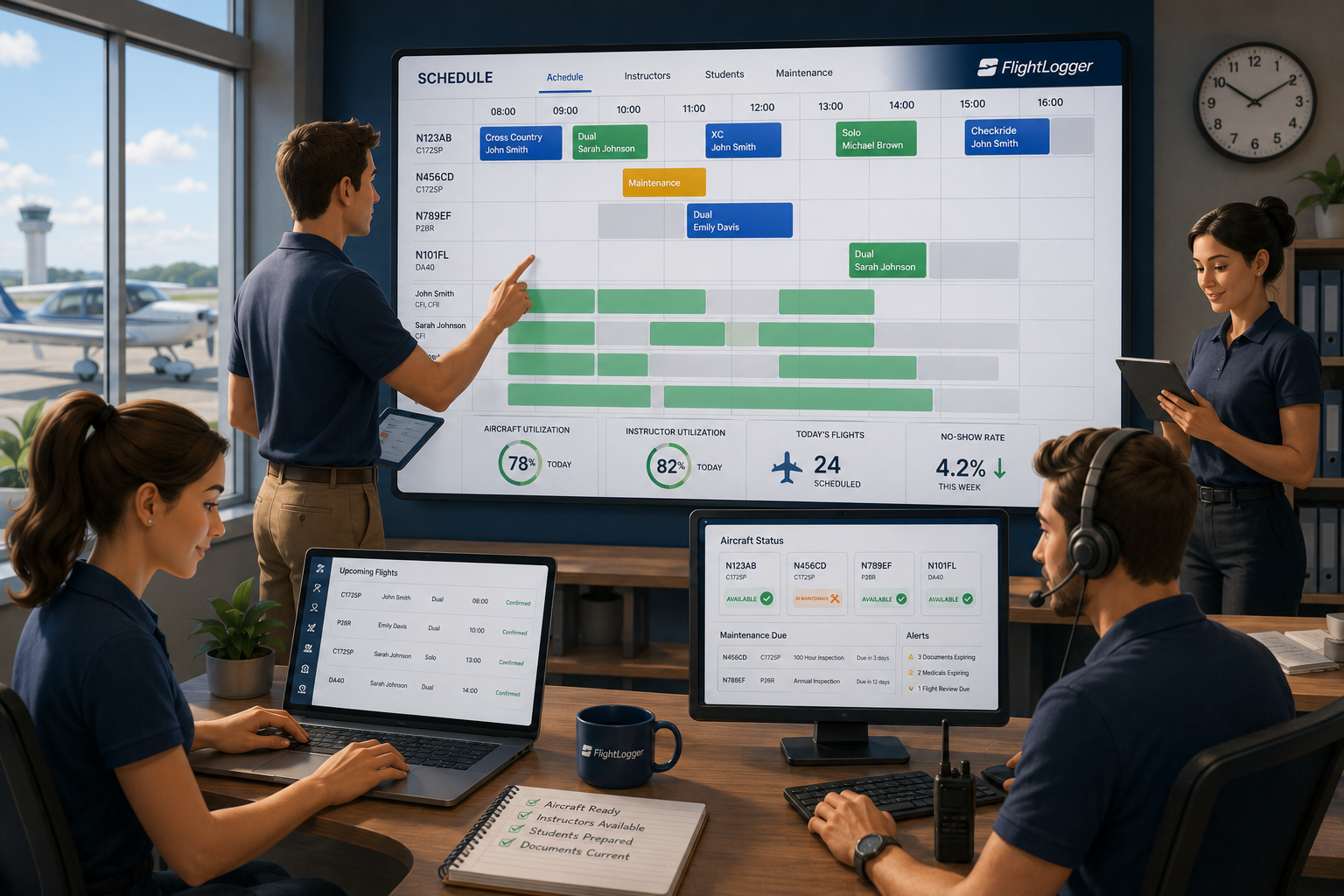
FlightLogger – The Flight School Operating System is designed to coordinate every aspect of flight school scheduling through one connected platform.
FlightLogger enables schools to:
- Schedule aircraft, instructors, and students together
- Connect scheduling with student progression
- Integrate maintenance planning with aircraft availability
- Reduce scheduling conflicts
- Support multi-base operations
- Monitor fleet and instructor utilization
- Generate operational insights through real-time dashboards
Rather than treating scheduling as an isolated task, FlightLogger connects scheduling with training, maintenance, compliance, finance, and reporting—creating one operational system for the entire flight school.
Frequently Asked Questions
What is the best flight school scheduling software?
The best flight school scheduling software connects aircraft scheduling, instructor scheduling, student progression, maintenance planning, and operational reporting in one platform. This helps schools reduce scheduling conflicts while improving operational efficiency.
How do flight schools reduce scheduling conflicts?
Schools reduce conflicts by using connected scheduling software that provides real-time visibility into aircraft availability, instructor schedules, maintenance, and student progression. Automated conflict detection prevents many issues before schedules are finalized.
What's the best way to manage aircraft and instructor scheduling?
Aircraft and instructors should be scheduled together rather than separately. Integrated scheduling platforms coordinate both resources simultaneously, ensuring the right instructor and aircraft are available for each lesson.
Why is scheduling so important in flight training?
Scheduling directly affects student progression, instructor productivity, aircraft utilization, and operational efficiency. Effective scheduling helps flight schools deliver consistent training while reducing administrative work.
Scheduling Software Should Power Your Entire Operation
Choosing scheduling software isn't just about replacing a calendar.
It's about choosing the operational platform your flight school will rely on every day.
The most effective flight schools use flight school scheduling software that connects aircraft scheduling, instructor scheduling, student progression, maintenance, compliance, and reporting into one system. The result is fewer conflicts, better resource utilization, and a more efficient training operation.
That's why more organizations are choosing FlightLogger – The Flight School Operating System to manage scheduling as part of a connected operational platform that supports every aspect of flight training.
Book a Walkthrough!
See FlightLogger in action and discover how we can help you achieve significant efficiency gains, streamline compliance, and make your daily operations smoother.